FOR COACHES PREPARING A NEW CLASS
How to manage your first coaching class
Prepare the people, place and plan before the first arrival, then leave the session with a clear record of what happened and what comes next.
Keep the first class manageable: confirm the roster and schedule, choose one main learning goal, prepare a flexible session, and agree how families will receive updates. In Coach Personal, set up the term and class before adding players and a class training plan.
Confirm who is coming and where they need to be
Before you design activities, confirm the age range, experience, expected numbers, venue and session length. Check what participants need to bring, how they will arrive and leave, and which adult you should contact when coaching children. Keep one current roster rather than several conflicting lists.
Give families the specific meeting point, not only a venue name. Explain how you will communicate a weather change or cancellation. Check your venue, qualification, insurance and safeguarding arrangements before the class; the business-starting guide covers the main questions for Australian coaches.
Choose one main learning goal
Decide what you want participants to understand or attempt by the end, and choose something you can actually observe. For a beginner group, that might be finding a balanced starting position or making a pass to a ready partner. Avoid making the first lesson a test of every skill in the sport.
Prepare a simpler and a more challenging version of the central activity. Ask participants what they have tried before and what they enjoy. The Australian Sports Commission's community coaching approach puts participants' needs and motivations at the centre; use that as a prompt to adapt, not to deliver the same session regardless of the group.
Write a short session outline
Give the session a beginning, a main practice and a finish. Include explanations, equipment changes, rest and questions in your available time. Write down the cue you will use to stop an activity and how you will regroup people without leaving someone unattended.
The outline is a working plan. Adjust it for the participants, environment and your responsibilities on the day. If an activity needs more explanation than expected, simplify the next activity rather than rushing the whole group through a timetable.
Set up the term and class in Coach Personal
In the Coach Personal workspace, open Classes → Terms. Use + to open New Term, enter the term details and Save. Return to Classes → Classes, then use + → New Class. Confirm the Term in the class form, complete its schedule and details, and Save. Create a term before adding the class schedule details.
Open the class and check that its schedule and details represent the real session. From Class actions, choose Add Player. The Add Class Player form asks for a name and a valid Player or Parent Email, then Save. Coach generates a Coach Player ID; that roster record is not proof that the family has accepted a connection.
- Use the email address the invited adult will use in Player.
- Check the correct term and class before creating plans or recording reviews.
- Confirm the invitation and connection separately; do not assume saving an email connects a profile.
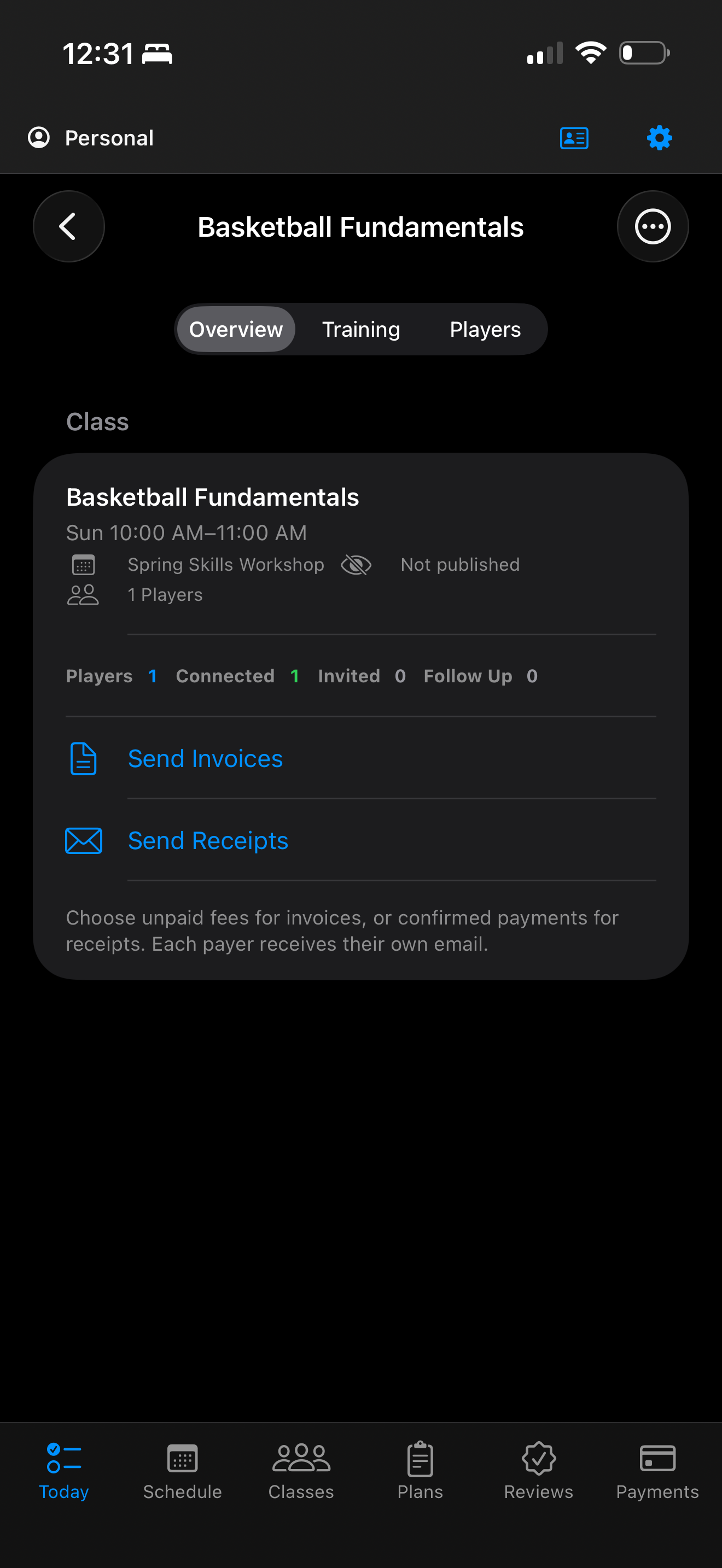
Real app screens · English interface · Sample training data
Complete the Player connection separately
After the class invitation has been sent successfully, the invited adult signs in to Player using the invited email and completes the relevant sport profile. In Player, open Classes → Inbox → Class Invitations. Choose the invitation, select the appropriate same-sport profile under Accept for Player, and use Accept Invitation. Where guardian approval is required, follow the approval statement and Approve and Join Class.
Confirm the intended athlete profile joined the intended class before relying on the shared plan. An adult may manage more than one profile, so an accepted invitation for one person should not be treated as acceptance for every family member.
Teach the group in front of you
Arrive with enough time to check the space and equipment before participants start. Explain the main aim in plain language, show the first activity and check that everyone understands where to go. Keep explanations short enough that you can observe people trying the activity.
Notice who needs a different cue, a simpler task or more time. Record brief observations when practical, rather than turning the class into constant data entry. If the space, weather or group makes your plan unsuitable, adjust or stop in line with your responsibilities and local arrangements.
Record useful feedback after the lesson
Separate what happened in a specific task from your assessment of a player's skill. A participant may complete the exercise while still needing help with the underlying technique. Write feedback that names what you saw and one next action, rather than relying on a star score alone.
In Coach, open Reviews and choose the relevant Skills or Lessons area, then the plan or lesson and the item you are reviewing. Set each player's rating and optional Feedback, then explicitly choose Save ratings. Check the displayed save and sync result: a change saved on the device or waiting to sync is not the same as feedback successfully sent.
Leave one clear next step
End with a short recap of the session's aim and what participants can work on next. After the class, update any schedule changes, note follow-up for the responsible adult and adjust the next plan using your observations.
A class plan saved in Coach still needs its separate Publish step before connected players can see it. Player's Coach Plan gives the family a place to find the published work. Keep the next practice small and understandable; the aim is a repeatable teaching routine, not a perfect first-day record.
Explore Coach's class and planning tools ↗See the Player experience ↗
First-class checklist
- Correct roster, adult contacts, meeting point and schedule.
- Venue, equipment and appropriate supervision arrangements ready.
- One learning goal, an adaptable outline and a clear closing message.
- Correct Coach term and class; invitations and profile connections checked.
- Specific feedback saved, sync status checked, and next session prepared.
The product steps describe Coach Personal and the corresponding Player class connection. Organisation roles and permissions differ. Adapt teaching activities to your participants and setting; examples are illustrative, not recorded customer sessions.